


A deal is rarely won by the person who takes your calls. Gartner research puts a typical B2B buying group at six to ten stakeholders, each arriving with four or five pieces of research they gathered on their own. Forrester’s State of Business Buying found that close to 89% of buying decisions cross more than one department. Buying committee mapping is the practice of recording every one of those people inside the account record, along with what they want, what they are worried about and how much say they actually have.
Most CRMs hold one primary contact and a deal value. That is enough to forecast badly. Mapping the full committee turns a single point of contact into a picture of how the decision will actually be made.
What Buying Committee Mapping Means in Practice
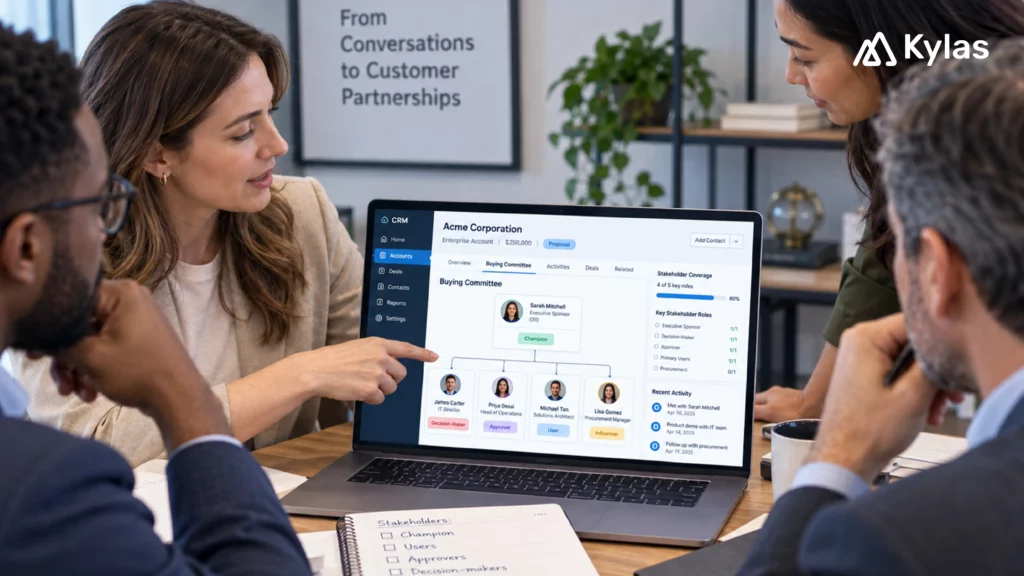
A buying group map is a view of one target account showing every individual involved in the purchase, the role each plays, their level of influence and their current position on your solution. It sits inside the account record, not in a spreadsheet on someone’s desktop.
The point is not to collect names. It is to answer three questions before the deal reaches negotiation: who decides, who can quietly stop this, and who have we never spoken to.
The Roles Worth Tracking
• Champion: The person who wants the change and will argue for it internally when you are not in the room. Champions are usually easy to spot because they respond fastest. They are also the most common single point of failure, since a champion who changes jobs takes the deal with them.
• User: The team that will work on the product daily. Users rarely sign anything, but their objections carry weight late in the cycle, and a user group that was never consulted is a reliable source of last-minute resistance.
• Approver: Finance, procurement, IT or the business head who signs. Approvers often enter the process late, ask questions nobody prepared for and judge the purchase on criteria the champion never mentioned.
• Blocker or influencer: Security, legal, compliance or a rival department with a competing budget request. This role is the one most sales teams discover too late.
One person may hold several roles in a small company, and each role may have several people behind it in a large one. Effective stakeholder mapping sales work records the role, not the job title, because a business card rarely tells you who decides.
What the Buying Committee Looks like across Industries
The four roles stay constant. Who fills them does not. Mapping an account is faster when you already know the shape the committee usually takes in that sector.
| Industry | Typical champion | Users | Approvers | Common blocker |
| Manufacturing | Sales head or plant head | Area sales managers, service engineers, distributors | Promoter or CFO | IT, on ERP integration and data ownership |
| IT and ITeS | Delivery or practice head | Project managers, consultants, pre-sales | CTO and CFO | Security review and vendor due diligence |
| Edtech and higher education | Admissions head | Counsellors, telecallers, faculty coordinators | Director, trustee or governing board | Finance, on per-seat cost at scale |
| Healthcare | Operations or centre manager | Front-desk staff, patient coordinators | Medical director or owner | Data privacy and patient record handling |
| Fintech and insurance | Regional sales manager | Agents, advisors, branch teams | Compliance head and CFO | Regulatory and audit requirements |
| Real estate | Sales head | Site teams, channel partners, telecallers | Promoter or director | Marketing, competing for the same budget |
Building the Buying Group Map in Your CRM
Start with the account, not the deal. Create the company record first, then add each person as a contact linked to it, so the map survives after the current deal closes or stalls.
• Add a role field: A custom field on the contact record with champion, user, approver, blocker and influencer as options is the backbone of the whole exercise. Without it you have a contact list, not a map.
• Score influence separately from seniority: A plant head and a quality manager may sit three levels apart on the org chart and carry the same weight in this particular decision. A simple high, medium or low influence field is enough. Overengineering is where most teams give up.
• Record the relationship owner: Note which person on your side owns each contact. This is what tells you whether the account is genuinely multi-threaded or whether one rep is carrying all five relationships alone.
• Log every meeting against the individual: When calls, emails and meetings are tracked on the contact record rather than only on the deal, the account timeline shows who you have engaged recently and who has gone quiet.
Tracking Objections at the Individual Level
Objections are usually logged as a property of the deal. That loses the most useful information, which is who raised the concern.
Record objections against the person: the CFO wants a twelve-month payback, IT is asking about data residency, the regional manager doubts the team will adopt it. Three concerns, three people, three different answers needed. When a deal note reads only “pricing concerns,” nobody knows who to go back to.
Kylas supports this through notes and custom fields on the contact and account records, so each stakeholder’s position sits alongside their activity history rather than in a separate document.
Finding the Relationships You Are Missing
The most valuable output of a buying group map is the gaps. Once roles and owners are recorded, run a simple filter on the account: which roles have no name attached, and which contacts have had no activity in thirty days.
Two patterns show up repeatedly. The first is an account with a strong champion and no approver identified, which usually means the deal will stall at the budget stage. The second is an account where every contact belongs to one rep, which means the deal is one resignation away from restarting.
Both are visible in a report filtered by role and last activity date. Neither is visible in a pipeline view.
Conclusion
Pick your five largest open deals and map them properly. You will usually find one account where the approver was never identified and one where a whole user group was skipped. Fixing those two gaps pays for the exercise.
Buying committees are not getting smaller. The teams that track them person by person, rather than as a single contact with a deal value attached, are the ones that stop losing deals to people they never met.
Discuss this workflow in a Kylas demo.
FAQs
1. What is buying committee mapping?
Buying committee mapping is the practice of tracking every decision-maker in a CRM account record, including Champions, Users, Approvers, and Blockers, so you can manage their influence and objections through a clear buying group map.
2. How does a buying group map differ from an org chart?
An org chart shows corporate reporting lines. A buying group map visualizes actual decision-making weight for a specific purchase, helping reps execute better stakeholder mapping in sales regardless of official job titles.
3. Which roles belong on a buying group map?
Every buying group map should track four core roles during buying committee mapping: – Champion: Drives the purchase internally. – User: Evaluates daily product utility. – Approver: Controls budget and signs contracts. – Blocker/Influencer: IT, legal, or security leads who can halt the deal.
4. Can you run buying committee mapping in a CRM without custom code?
Yes. Effective stakeholder mapping in sales requires only linking multiple contacts to one account, adding custom fields for Role and Influence Level, and logging objections directly on individual contact records.
5. How often should sales teams update a buying group map?
Update your buying group map after every interaction and review it at each pipeline stage. Regular buying committee mapping ensures you spot missing relationships before entering negotiations.
6. Why is stakeholder mapping in sales critical for small teams?
Proper stakeholder mapping in sales prevents single-point-of-failure risks like losing a deal when a sole champion leaves by using a buying group map to multi-thread accounts early.